Modifying the Required Game Port Number
INFO
If you don't need to switch back and forth between playing "CHUNITHM" and "maimai / ONGEKI", and have no other special requirements, you can safely skip this section.
WARNING
This guide only applies to users connecting via the Official SEGA Serial Protocol. If you modified the configuration files following the tutorial below, but later want to use Virtual Swiping (Enter Key) or AimeIO, please make sure to restore the configuration files to their default settings, otherwise they will not work properly.
Introduction
| Game | Default Port Number |
|---|---|
| maimai DX | COM1 |
| ONGEKI | COM1 |
| CHUNITHM | COM4 |
The above are the default port numbers for the three games, but they are not fixed. Users can change the card reader port number used by the game by modifying the configuration file.
Consider this scenario: You only have one computer and one card reader, but want to play multiple SEGA rhythm games. Since maimai and ONGEKI have the same default port number, you usually only need to set it up once. However, CHUNITHM's port number is different, which is why this tutorial is necessary.
Currently, most SEGA games use AMDaemon, and card reader related settings are uniformly managed by AMDaemon. Players can change the card reader port number required by the game by modifying the configuration file passed to AMDaemon.
Modifying the Files
File Introduction
The following are the AMDaemon configuration files that might exist in a normal game directory:
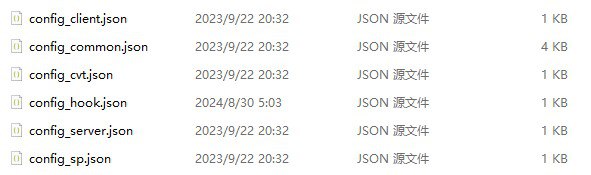
config_client.json,config_server.jsonRelated to the delivery server, can be ignored in this article.config_hook.jsonComes with Segatools, used to forcibly override some settings.config_cvt.json,config_sp.jsonCHUNITHM exclusive configuration files.config_common.jsonConfiguration file common to all games.
Usually, the card reader port number configuration is located in config_common.json. But for CHUNITHM, you need to modify config_cvt.json or config_sp.json depending on the cabinet you use at startup.
How to Modify
Open config_common.json or config_cvt.json / config_sp.json, search downwards for the aime entry:
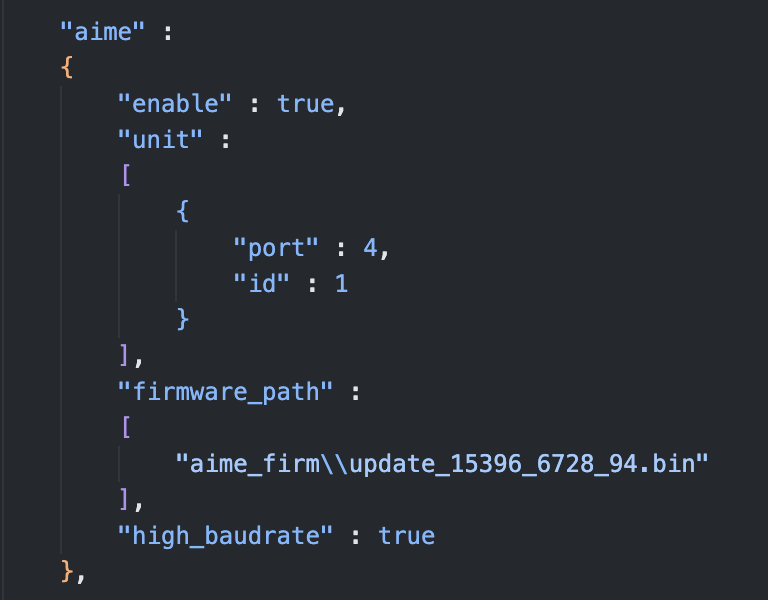
Among them:
"port": 4The 4 here is the port number used by the card reader (corresponding to COM4). You can change it to any other port number that is not occupied by an official device.
What are the "other port numbers used by official devices"?
Taking CHUNITHM as an example, SEGA officially uses COM1 to connect the Ground Slider (ground touch panel). Therefore, you cannot use COM1 when modifying the card reader port number.
Here are the port numbers officially occupied but unavailable for the card reader in common games:
| Game | Occupied Port Numbers and Uses |
|---|---|
| maimai DX | COM2: VFD Screen COM3 / COM4: 1P / 2P Touch Screen COM21 / COM23: Lighting Board |
| ONGEKI | COM2: VFD Screen COM3: Lighting Board |
| CHUNITHM (SP) | COM1: Touch Panel COM2: VFD Screen COM20 / COM21: Lighting Board |
| CHUNITHM (CVT) | COM1: Touch Panel COM2 / COM3: Lighting Board |
The port numbers above cannot be used for the card reader port.
Use Case
Requirement: I only have one computer and one card reader, but want to switch back and forth between playing CHUNITHM and maimai.
You can follow these steps:
- Edit
config_common.jsonof maimai and change the card reader port number toCOM7. - Edit
config_cvt.jsonorconfig_sp.jsonof CHUNITHM and similarly change the card reader port number toCOM7. - Open Windows Device Manager, change the actual port number of the card reader to
COM7as well, and re-plug the card reader.
Once completed, you can switch between the two games without having to repeatedly change the card reader port number.