KONAMI Game Configuration Instructions
TIP
- This feature is limited to the Standard Edition.
- The Lite Edition can unlock this feature for CN¥49.
CardIO Card Reading Settings
Some older firmware versions require binding HID lights before card reading can work.
Open spicecfg, select Advanced at the top.
For older Spice versions, this is under Options, and you may need to show hidden options.
FindCardIO HID Reader Support (-cardio)and check it, as shown below: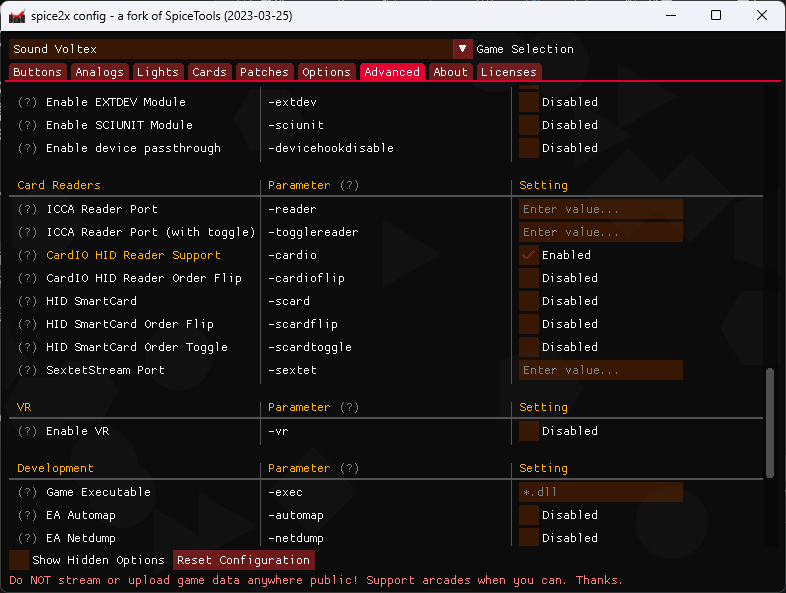
If the card reader does not work after checking
CardIO HID Reader Support (-cardio), which commonly happens with older Spice versions or systems older than Windows 10, try checkingHID SmartCardas well.
Please only check it after confirming that the reader truly does not work, and do not enable it unless necessary.If the card swipe slot is incorrect, for example in games like IIDX with 1P / 2P slots, check the corresponding
xxx Order Flipoption below to adjust it.
By default, CardIO runs in maximum compatibility mode. The readable card types are:
| Card Type | Readable |
|---|---|
| Amusement IC | Yes |
| Any ISO14443-A | Yes |
| Any Felica card (Suica / AIC / Osaifu-Keitai) | Yes |
| Any Aime card | Yes |
| ISO15693 (legacy e-amusement pass) | No |
You can further control the range of readable cards, such as ISO14443-A and Aime, in HINATA Go.
HID Light Binding
The game outputs light signals to the card reader when the following conditions are met:
- SDVX is in Valkyrie cabinet mode
- IIDX is in Lightning cabinet mode
Bind the lights as follows:
Open spicecfg, select Lights at the top, and find
IC Card Reader *.Bind as shown in the figure below:
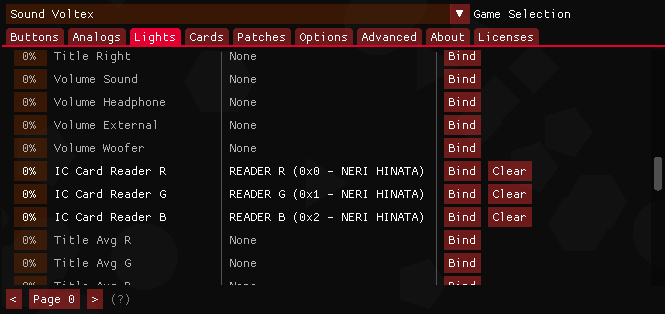
For games like IIDX that have a 2P side, the reader is split into six channels for 1P / 2P.
Bind the side you play on. If you use two card readers, you can bind all channels.Adjust light brightness in spicecfg -> Advanced ->
Light Brightness Adjustment.